
Every B2B SaaS site accumulates orphan pages. Site migrations create them. CMS template changes create them. Content consolidations create them. The pages survive, but the internal links connecting them to the rest of the site disappear.
AI search engines now account for a growing share of how buyers discover and evaluate software. When a page has zero internal links, it carries no authority signal for AI engines to evaluate. It is effectively invisible to both traditional and AI search. This guide covers how to find orphan pages in under 30 minutes using Screaming Frog, Ahrefs, Semrush, or a manual spreadsheet comparison, why the real cost goes beyond crawl budget, and how to build a prevention system so the problem stops recurring.
What orphan pages actually are (and what they are frequently confused with)
Orphan pages are live URLs that receive zero internal links from any other page on the site, making them unreachable through normal site navigation. They exist in your CMS and may appear in your sitemap, but no page on your site actually links to them.
This definition is precise for a reason. Orphan pages are frequently confused with two other problems, and the fix for each is different.
Dead-end pages have no outgoing links. Orphan pages have no incoming internal links. A page can technically be both. Dead-end pages need outbound links added. Orphan pages need inbound links restored. The remediation path for each is different, which is why the distinction matters. Restoring those connections the right way is a question of cluster architecture, covered in our guide to internal linking for SaaS topic clusters.
Orphan pages are also distinct from broken pages (404s or 5xx errors). An orphan page loads fine. It just has no internal pathway leading to it.
Here is the nuance that matters for SEO: an orphan page can still be indexed. Google may discover it through your sitemap XML or through external backlinks. But indexed orphans receive zero internal link equity, and they typically rank poorly because they carry no contextual authority signal from your own site structure.
In PropTech SaaS, orphan pages commonly appear when property listing categories lose their navigation link after a site redesign. The listing pages stay live, but the category page that connected them to the rest of the site architecture disappears during a template swap.
Why orphan pages cost more than crawl budget
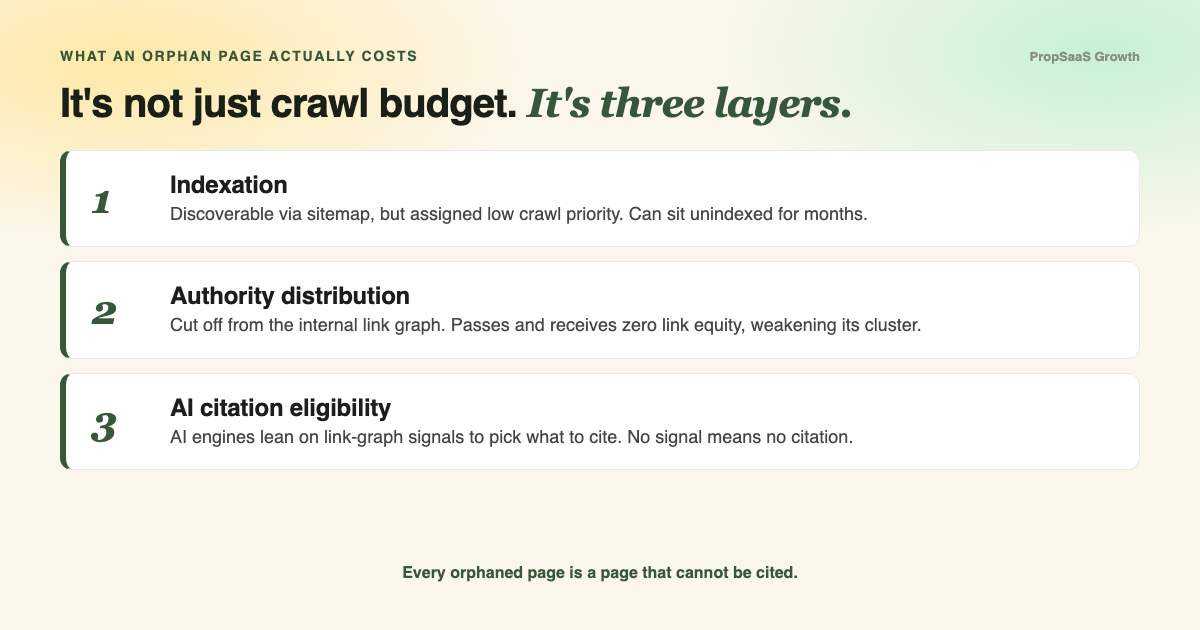
Orphan pages damage your site on three distinct levels: indexation, authority distribution, and AI citation eligibility. The full picture goes well beyond crawl budget.
Layer 1: Indexation
Google may discover orphaned pages via sitemap, but it assigns them low crawl priority. Google's crawl budget documentation defines crawl budget as a function of crawl capacity and crawl demand (popularity, staleness, perceived inventory). For large B2B SaaS sites with hundreds of pages, this means orphaned content can sit unindexed for months while Google allocates crawl demand to pages with stronger internal signals. The same dynamic plays out at scale when app, staging, or dynamic product URLs leak into the queue, which is the focus of our guide to fixing SaaS crawl budget. Crawl capacity also responds to how fast your server answers, which is one reason improving Core Web Vitals compounds beyond user experience.
One important qualification: Google notes that crawl budget is only a material concern for sites that are large or change frequently. For smaller B2B SaaS sites (under 500 pages), the next two layers matter more.
Layer 2: Authority distribution
Internal links pass equity. Every orphaned page receives none. When a page is cut off from your internal link graph, it cannot contribute to or benefit from your topical cluster architecture. In a hub-and-spoke model, an orphaned spoke page weakens the entire cluster because the hub loses a supporting signal, and the spoke loses all contextual authority.
Layer 3: AI citation eligibility
The third cost is AI citation eligibility. AI engines (ChatGPT, Perplexity, Gemini) rely on link-graph authority when selecting passages to cite in AI-generated answers. Orphaned content lacks the internal authority signals that make a passage citation-worthy.
The scale of AI crawling makes this urgent. GPTBot raw requests grew 305% year-over-year from May 2024 to May 2025 (Cloudflare, 2025). AI bots averaged 4.2% of all HTML requests across the Cloudflare network in 2025, peaking at 6.4%. For B2B SaaS companies competing for AI visibility, every orphaned page is a page that AI engines can technically fetch but will deprioritize due to weak authority signals.
Orphan pages sever internal link equity, remove content from cluster architecture, and eliminate pages from AI citation eligibility, because AI engines rely on link-graph signals to assess passage authority.
How to find orphan pages in under 30 minutes
The fastest way to find orphan pages is to compare your sitemap URL inventory against a crawl-discovered URL list. Pages present in the sitemap but absent from the crawl are orphan page candidates. Every major SEO crawler automates this comparison.
Method 1: Screaming Frog (most control)
Screaming Frog gives you the most granular orphan page detection (full tutorial here). Here is the workflow:
- Enable sitemap crawling. Go to Configuration > Spider > Crawl and check "Crawl Linked XML Sitemaps."
- Connect external data. Link your Google Analytics and Google Search Console accounts via API Access. This lets Screaming Frog identify orphan pages that still receive traffic or impressions.
- Run the crawl, then click Crawl Analysis > Start.
- Check the "Orphan URLs" filter under the Sitemaps, Analytics, and Search Console tabs. Each tab shows orphans discovered through that specific data source.
- Export the combined orphan URL list via Reports > Orphan Pages.
Screaming Frog is the right tool when you need full control over crawl configuration, particularly for B2B SaaS sites with JavaScript rendering, staging environments, or complex subdomain structures.
Method 2: Cloud crawlers (Ahrefs and Semrush)
Cloud-based crawlers trade some granularity for convenience and automated scheduling.
Ahrefs Site Audit: Enable "Crawl XML Sitemaps" in your project settings, connect Google Search Console, and run the audit. Look for the "Orphan page (has no incoming internal links)" flag in the Pages report.
Semrush Site Audit: Connect GSC, run the audit, and search for "Orphaned pages in XML sitemap" under the Issues tab.
Both tools support automated scheduling, meaning you can set up weekly or monthly orphan page checks without manual intervention. The trade-off: they offer less granular crawl configuration than Screaming Frog for complex site architectures.
Method 3: Manual comparison (no paid tools)
If you have no paid crawler access, you can still identify orphan pages manually:
- Download your XML sitemap and paste all URLs into a spreadsheet.
- Export your indexed URLs from Google Search Console (Pages report > export).
- Use VLOOKUP or conditional formatting to flag URLs that appear in GSC but are missing from a link-path crawl of your site.
Limitation: This method catches indexed orphans but misses pages that are neither crawled nor indexed. For a comprehensive audit, a dedicated crawler is worth the investment.
Compare your sitemap URL inventory against a crawl-discovered URL list. Pages in the sitemap but missing from the crawl are orphan page candidates.
How orphan pages form (and how to stop them)
Orphan pages form when the internal link connecting a page to the site structure is removed but the page itself remains live, typically during site migrations, CMS template changes, or URL restructures.
Understanding the root causes matters because the goal is a prevention system that eliminates orphan creation at the source. Enterprise-scale orphan page detection follows the same principle: design architecture that eliminates orphan creation at the source.
Common causes:
- Site migrations. URL structure changes and template swaps break existing internal links. The pages survive the migration, but their link pathways do not.
- CMS updates. Category and tag restructures remove navigation links. A property management SaaS redesigns its pricing page structure, moving from
/pricing/to/plans/. The old/pricing/enterprise/page stays live but loses all internal links. - Content consolidation. When you merge two pages into one, the old URL often retains its content but loses all the internal links that pointed to it.
- Dynamic filtering pages. URLs generated by faceted navigation or search filters can create hundreds of pages with no static link path from the main site structure.
Prevention checklist:
- Run a pre-migration internal link audit. Export every internal link relationship before changing URL structures.
- Build a redirect map that accounts for internal links (both the URL redirect and the internal link source pages that need updating).
- Run a post-launch crawl within 48 hours of any migration or major CMS change.
- Set up automated monitoring: schedule recurring crawls in Screaming Frog or configure cloud crawler alerts to flag new orphan pages monthly.
Orphan pages form when the internal link connecting a page to the site structure is removed but the page itself remains live. Prevention requires auditing link relationships before every migration, not just URL mappings.
What to do with orphan pages once you find them
Every orphan page needs one of three actions: re-link it, redirect it, or delete it. The right choice depends on whether the page still serves a purpose. Here is the decision framework:
| If the page... | Action | How |
|---|---|---|
| Has traffic, backlinks, or topical value | Re-link | Add contextual internal links from 2-3 relevant pages. Place in navigation if appropriate. |
| Duplicates or overlaps with a stronger page | Redirect | 301 redirect to the canonical version. Update your sitemap. |
| Is outdated, irrelevant, or thin | Delete | Remove the page. If it has any backlinks, 301 redirect to the nearest relevant URL first. |
| Is a landing page for paid traffic only | Noindex | Keep it live for ad campaigns but add noindex to prevent search engines from allocating crawl budget to it. |
Re-linking is almost always the highest-value action. When you add contextual internal links to an orphaned page, you restore its connection to the site's authority graph. This benefits both the orphaned page (it gains link equity and crawl priority) and the linking pages (they gain a relevant outbound link that strengthens cluster coherence).
For B2B SaaS sites operating a hub-and-spoke content architecture, re-linking orphan pages back into the appropriate cluster is the single most impactful fix because it compounds across every page in the cluster.
When deciding between redirect and delete, check for backlinks first. A page with zero traffic and zero backlinks can be safely deleted. A page with even one authoritative backlink should be 301 redirected to preserve that equity.
Key insight: orphan pages are a dual-visibility problem
For B2B SaaS companies, orphan pages represent content that has been cut off from both search engines and AI answer engines. Every orphaned page is a page that cannot contribute to your topical authority, cannot pass or receive link equity, and cannot be cited in an AI-generated answer.
Every orphaned page is a page that cannot be cited. For B2B SaaS companies competing for AI visibility, orphan page remediation is an authority-building investment.
The compounding effect is what makes orphan page remediation strategic. When you re-link an orphaned page back into a topical cluster, you strengthen every page in that cluster. The hub page gains an additional spoke signal. The re-linked page gains the authority context it was missing. Adjacent pages in the cluster benefit from a stronger overall authority signal. This compounds: the stronger the cluster, the better each individual page performs in both traditional search and AI answer engines.
Benchmark guidance: For a B2B SaaS site with 200 to 500 pages, more than 5-10% orphaned pages signals a structural architecture problem. A handful of orphans after a content migration is normal. Dozens of orphans across multiple sections of your site suggests the internal linking system itself needs rebuilding.
At PropSaaS Growth, orphan page remediation was one component of the technical foundation work we completed for Azibo, a PropTech SaaS company. Azibo grew from 4,000 to 122,000 monthly organic visits over 18 months. The technical SEO cleanup included eliminating orphaned pages, tightening meta data, and confirming all internal links were functional. Orphan page remediation alone does not produce that result, but it is a necessary layer of the technical foundation that enables organic growth to compound.
Action steps: your orphan page audit checklist
Run this checklist this week. Every step uses tools and processes covered earlier in this guide.
- Export your full URL inventory. Combine your sitemap URLs with a CMS export to capture every live page, including pages that may not be in the sitemap.
- Run a site crawl. Use Screaming Frog, Ahrefs Site Audit, or Semrush Site Audit with sitemap crawling enabled and Google Search Console connected.
- Compare. Flag URLs that appear in your inventory but are absent from the crawl-discovered URL list. These are your orphan candidates.
- Validate. Check each flagged URL for traffic (Google Analytics), backlinks (Ahrefs or GSC), and topical relevance to your current content strategy.
- Decide. Apply the decision framework: re-link, redirect, or delete each orphan based on its value.
- Implement fixes and update your sitemap. Remove deleted pages from the sitemap. Add re-linked pages to appropriate navigation or contextual link placements.
- Re-crawl within one week to confirm all fixes resolved correctly and no new orphans appeared.
- Set up recurring monitoring. Schedule a monthly crawl with orphan page alerts. Run a manual check after every site migration, CMS update, or major content restructure.
The goal is a system that prevents orphan pages from forming, not a quarterly cleanup that treats them as inevitable.
The method is straightforward: compare your sitemap against a crawl, flag the gaps, and decide what each orphan page deserves (re-link, redirect, or delete). Every tool covered in this guide supports the workflow, and the initial detection takes less than 30 minutes. The higher-value work is building a prevention system. Every site migration needs a link audit before launch. Every CMS restructure needs a post-launch crawl within 48 hours. Every content consolidation needs internal link updates alongside the redirect map. For B2B SaaS teams that want a comprehensive technical health check covering orphan pages, internal link architecture, cluster gaps, and AI visibility readiness, the Foundation Audit is the place to start.
Frequently asked questions
How do you find orphan pages in WordPress?
WordPress-specific plugins can surface orphan pages without a standalone crawler. Rank Math PRO includes an orphan page filter in its analytics dashboard. Link Whisper generates an orphan content report showing pages with zero internal inbound links. You can also run Screaming Frog against your WordPress site for the most thorough detection, combining sitemap, analytics, and Search Console data in a single crawl.
Are dead-end pages the same as orphan pages?
Dead-end pages and orphan pages are different problems. Dead-end pages have no outgoing links (they link to nothing). Orphan pages have no incoming internal links (nothing links to them). A single page can be both, but the fixes diverge: dead-end pages need outbound links added, orphan pages need inbound links restored.
Can Google still index orphan pages?
Yes. Google can discover and index orphan pages through your XML sitemap or through external backlinks pointing to the page. The problem is that indexed orphan pages receive zero internal link equity. They typically rank poorly because Google's crawl demand algorithm deprioritizes pages with weak internal signals.
How many orphan pages is too many?
For a B2B SaaS site with 200 to 500 pages, more than 5-10% orphaned is a signal of structural architecture problems. A small number of orphans after a migration or content update is normal. If orphan pages persist across multiple site sections, the internal linking system itself likely needs a comprehensive audit.
How often should you check for orphan pages?
Monthly for active sites. Run a check after every site migration, CMS update, or major content restructure. The most reliable approach is automated monitoring: schedule a recurring crawl in Screaming Frog or set up cloud crawler alerts that flag new orphan pages as they appear.
Do orphan pages affect AI search visibility?
Yes. AI engines use link-graph signals to evaluate passage authority when selecting content to cite in generated answers. Orphaned content lacks these signals. GPTBot requests grew 305% year-over-year in 2025 (Cloudflare), and AI bots now average 4.2% of all HTML requests. For B2B SaaS companies investing in AI answer engine optimization, orphan page remediation directly impacts citation eligibility.

Gemma Smith, Founder, PropSaaS Growth
Gemma builds ICP-driven organic and AI visibility programs for B2B SaaS companies in PropTech, FinTech, and vertical software categories. 10+ years in PropTech. AirOps Champion.