

Core Web Vitals improvements compound when they are applied at the template level and re-audited quarterly. SaaS sites fail CWV for predictable, SaaS-specific reasons: JavaScript-heavy rendering, third-party script bloat, and layout instability from dynamic content.
As of May 2026, only 55.9% of tracked origins pass all three Core Web Vitals thresholds (LCP, INP, CLS) according to Chrome User Experience Report data (Digital Applied, June 2026). SaaS sites typically perform worse than that average because of heavy JavaScript bundles and client-side rendering.
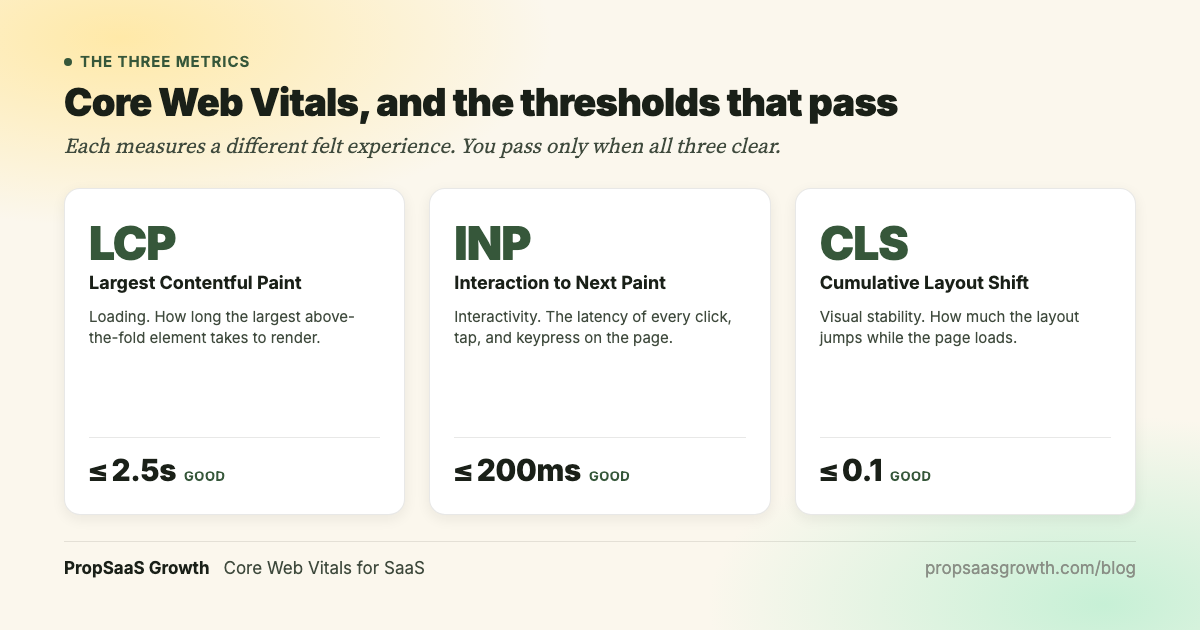
The three Core Web Vitals metrics are: Largest Contentful Paint (LCP), which measures loading performance with a threshold of 2.5 seconds or less; Interaction to Next Paint (INP), which measures interactivity with a threshold of 200 milliseconds or less; and Cumulative Layout Shift (CLS), which measures visual stability with a threshold of 0.1 or less.
Core Web Vitals is a confirmed Google ranking signal, but it functions as a tie-breaker among pages with similar content quality. Fixing CWV on a page with strong content removes a technical ceiling on that page's ranking potential. Understanding how AI search engines retrieve and rank content adds another reason to invest in technical foundations. This guide walks through the template-level fixes that SaaS teams can hand off to engineering this week.
Which SaaS pages to fix first
Prioritize the page templates that drive acquisition: homepage, pricing, demo request, comparison pages, and high-traffic blog templates. Google Search Console reports Core Web Vitals by URL group, so fixing one SaaS pricing page template improves scores across every pricing page built on that template.
This is the template-archetype approach. A PropTech property management platform with 200 listing pages can fix one listing template and improve CWV scores across all 200 pages. The same logic applies to any SaaS vertical.
Priority order by template type:
| Template | Typical bottleneck | First fix |
|---|---|---|
| Homepage | Hero image/animation LCP | Optimize hero asset, preload LCP element |
| Pricing page | Dynamic pricing table INP | Defer non-critical JS, simplify table rendering |
| Demo/signup page | Form widget CLS + INP | Reserve space for form, audit third-party scripts |
| Comparison pages | Image-heavy LCP | Responsive images (WebP/AVIF), lazy-load below fold |
| Blog templates | Ad/widget CLS | Set explicit dimensions on all embeds |
| Case studies | Custom font LCP | Font-display swap, preload critical fonts |
One important distinction: Google crawls and ranks only public-facing marketing pages. CWV optimization for SEO should focus there. App performance is a product engineering priority with its own prioritization criteria, separate from technical SEO.
How to fix LCP on a SaaS site
LCP measures how long it takes for the largest visible element above the fold to render. The good threshold is 2.5 seconds or less according to Google's Core Web Vitals standards. On SaaS marketing pages, the LCP element is usually a hero image, product screenshot, or headline with a custom font. The fix path starts at the server and ends at the asset.
LCP is made up of sub-parts, and on JavaScript-heavy SaaS sites, TTFB (Time to First Byte) and resource load time account for the majority of LCP delay (Web Performance Calendar, December 2025). Understanding which sub-part is the bottleneck determines the fix.
Server response time (TTFB). A slow server response delays everything downstream. Edge caching through a CDN (Cloudflare, Fastly, AWS CloudFront) can reduce TTFB dramatically for static marketing pages. For SaaS sites using server-side rendering, ensure the rendering pipeline is cached at the edge for public pages.
Image optimization. Convert hero images and product screenshots to WebP or AVIF format. Use responsive sizing with srcset so mobile visitors load smaller assets. Preload only the LCP image using <link rel="preload"> in the document head.
Font loading. Use font-display: swap to prevent invisible text during font loading. Preload critical fonts that appear in above-the-fold headings. Every custom font file that blocks rendering adds directly to LCP.
Render-blocking resources. Inline critical CSS for above-the-fold content. Defer all non-essential JavaScript. Combining hero image optimization (WebP conversion, responsive srcset) with CDN edge caching is the highest-leverage LCP intervention for SaaS marketing pages, because it addresses both asset size and server response time at the same time. FinTech and PropTech landing pages with full-bleed product screenshots benefit the most from this combination.
The highest-leverage LCP fix for most SaaS sites is reducing TTFB through edge caching, because it shortens every subsequent sub-part of the loading waterfall.
How to fix INP on a SaaS site
INP measures the latency of every user interaction (clicks, taps, key presses) throughout the entire page lifecycle. The good threshold is 200 milliseconds or less. INP replaced First Input Delay (FID) in March 2024, and it is the metric catching the most SaaS teams off guard because FID only measured the first interaction.
SaaS marketing pages struggle with INP for specific reasons: heavy JavaScript bundles, analytics and chat scripts competing for the main thread, and complex form interactions on demo request and signup pages.
Break up long tasks. Any JavaScript task that runs longer than 50 milliseconds on the main thread can delay input response. Use requestIdleCallback or setTimeout to break computation-heavy work into smaller chunks. For interactive elements like sortable tables or filterable product lists, move the processing logic to a web worker. Construction SaaS bid comparison tables, FinTech rate calculators, and PropTech listing filters all benefit from this pattern because it removes heavy computation from the main thread and brings INP below the 200ms threshold.
Audit third-party scripts by page type. Categorize every third-party script by the page types where it actually serves the primary conversion goal. Demo pages typically require form routing and analytics. A/B testing tools, heatmap scripts, and social proof widgets should be deferred or removed on pages where they add main-thread weight without supporting the conversion path.
Script loading strategy:
- Critical scripts (analytics, form handling): load normally.
- Important scripts (chat widget, CRM tracking): defer until after main content renders.
- Non-essential scripts (social widgets, experimentation tools): load on user interaction or after a delay.
INP directly affects how responsive a page feels during the interactions that lead to conversion: form fills, CTA clicks, and pricing toggle selections. When those interactions feel sluggish, visitors abandon before completing the action.
How to fix CLS on a SaaS site
CLS measures unexpected layout shifts during page loading. The good threshold is 0.1 or less. On SaaS sites, CLS problems usually come from images without explicit dimensions, dynamically injected banners, late-loading chat widgets, and CMS-authored content with variable-height embeds.
Set explicit width and height on all images and video embeds. This reserves space in the layout before the asset loads. Dimensions let the browser calculate the element's aspect ratio before the asset loads, preventing the page shift that occurs when an unsized image appears.
Reserve space for dynamic elements. Chat widgets, cookie banners, and promotional bars should have CSS placeholders that hold their space before the script loads. Use min-height on containers where dynamic content will appear.
Use CSS aspect-ratio for responsive media containers. This provides a modern, clean way to maintain proportional spacing regardless of viewport width.
Prevent font-loading reflow. Flash of invisible text (FOIT) causes a visible shift when the custom font finally renders. Using font-display: swap and preloading critical fonts eliminates this source of CLS.
PropTech listing pages and FinTech card-grid layouts are common sources of CLS because they load agent headshots, property thumbnails, or account icons lazily without reserved space. Adding explicit width and height attributes to all card images is a low-effort fix that eliminates this CLS source.
How we sequence CWV fixes for growth-stage SaaS
The audit-to-fix sequence matters as much as the individual fixes. At PropSaaS Growth, our technical SEO engagements start CWV work with a template-archetype audit that groups every URL into its page type, measures each type's field data separately, and generates dev-ready tickets prioritized by traffic-at-risk multiplied by conversion impact.
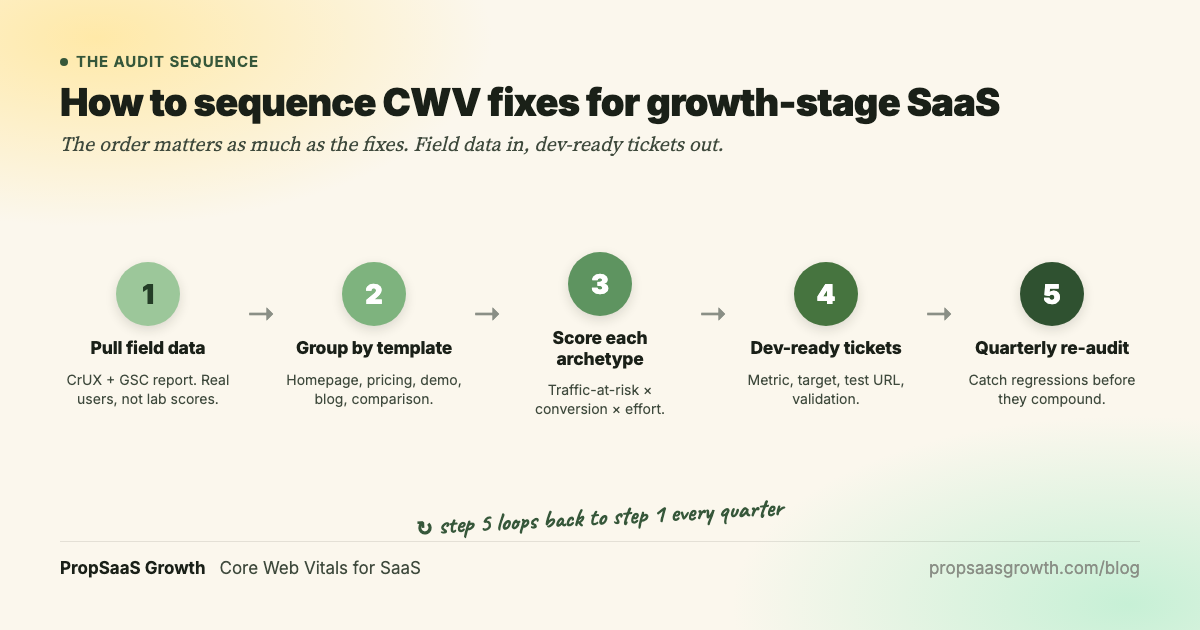
Here is the five-step sequence:
Step 1: Pull field data. Export CrUX data and the Google Search Console Core Web Vitals report. Google uses field data from real users for ranking decisions. Lighthouse lab data is useful for debugging specific issues once you know which template and metric to investigate.
Step 2: Group URLs by template archetype. Homepage, product pages, pricing, demo/signup, blog posts, case studies, comparison pages. Each group gets its own CWV scorecard.
Step 3: Score each archetype. Multiply three factors: traffic-at-risk (monthly organic sessions on failing pages), conversion impact (how close the template is to a revenue event), and engineering effort (estimated dev hours for the fix). This produces a prioritized list that engineering teams can work through in sprint order.
Step 4: Generate dev-ready tickets. Each ticket specifies the metric to fix, the target threshold, a test URL, and the validation method. A good CWV ticket looks like this:
Ticket: Reduce LCP on /pricing template from 3.8s to under 2.5s. Fix: Convert hero image to WebP, add <link rel="preload"> for LCP asset, enable edge caching on CDN. Test URL: /pricing. Validation: PageSpeed Insights field data shows LCP under 2.5s after 28 days of data collection.
Step 5: Quarterly re-audit. New feature deployments, marketing tool integrations, and CMS content updates introduce regressions. Vodafone documented that a 31% improvement in LCP led to 8% more sales (RumVision, November 2025). That result came from ongoing, sustained optimization.
The quarterly cadence catches script additions from marketing (a new heatmap tool, a chat widget upgrade) before they accumulate into a full CWV regression.
Core Web Vitals and AI search visibility
Core Web Vitals affect AI search visibility indirectly. AI crawlers (GPTBot, ClaudeBot, Google's AI systems) need fast, crawlable pages to retrieve and index content for AI answers. A SaaS page that fails CWV thresholds is often slow to serve to any crawler, human or AI, which reduces its chances of being retrieved and cited in AI answers.
The connection is structural. Fast TTFB and clean server-side rendering benefit all crawlers. If a page takes four seconds to render its main content, that delay affects GPTBot and ClaudeBot the same way it affects Googlebot. Slow pages also tend to rely on client-side JavaScript rendering, which many AI crawlers cannot execute.
Schema markup and structured data complement CWV improvements. Clean technical foundations (fast pages, proper schema, accessible internal linking) create the conditions for both organic ranking and AI citation eligibility. Pages with good Core Web Vitals tend to be faster for all crawlers, and that speed is a precondition for AI citation. The observed correlation between site performance and AI visibility reinforces why CWV fixes are a foundational investment.
Your CWV fix checklist
A numbered checklist your team can start working through this week:
- Run PageSpeed Insights on your five highest-traffic page templates. Note which metric (LCP, INP, or CLS) is failing on each template. Record both lab and field data scores.
- Pull the Google Search Console Core Web Vitals report. Identify which URL groups are in "Poor" or "Needs Improvement" status. Sort by number of affected URLs to find the templates with the widest impact.
- Score each template using traffic-at-risk x conversion impact x engineering effort. A pricing page template failing LCP with 5,000 monthly sessions scores higher than a blog archive page failing CLS with 200 sessions.
- Fix LCP first (usually the biggest lever). Optimize hero images to WebP/AVIF, preload the LCP asset, add CDN edge caching, and inline critical CSS. LCP improvements tend to produce the most visible score changes.
- Fix INP second. Audit third-party scripts by page type. Remove scripts that do not serve the page's primary conversion goal. Break up long JavaScript tasks on interactive pages.
- Fix CLS third. Set explicit
widthandheighton all images and video embeds. Reserve space for dynamically injected elements (chat widgets, cookie banners, promotional bars). - Validate with field data (CrUX) after 28 days. Google uses CrUX field data for ranking decisions. Lighthouse confirms the fix is technically deployed. Wait for the 28-day collection window of real user data before assessing ranking impact.
- Schedule quarterly re-audits. Every new feature deployment, marketing tool integration, or CMS content update is a potential regression source. A quarterly cadence catches these before they compound.
The takeaway
Run the template-archetype audit on your top five page templates this week. Identify which metric is failing on each template, score by traffic-at-risk and conversion impact, and generate dev-ready tickets your engineering team can action in the next sprint.
Core Web Vitals are a technical foundation that compounds. A fast site earns better crawl budget and better user engagement, and that crawl-capacity gain is one half of the picture in our guide to fixing SaaS crawl budget. Both are preconditions for organic ranking and AI citation eligibility. The fix is structural (templates across the site) and ongoing (quarterly re-audits that catch regressions before they accumulate). Every quarter you skip a re-audit is a quarter where marketing tool additions and feature deployments erode the gains you already made.
Frequently asked questions
What are the three Core Web Vitals metrics in 2026?
The three Core Web Vitals are Largest Contentful Paint (LCP), Interaction to Next Paint (INP), and Cumulative Layout Shift (CLS). LCP measures loading performance with a good threshold of 2.5 seconds or less. INP measures interactivity with a good threshold of 200 milliseconds or less. CLS measures visual stability with a good threshold of 0.1 or less. INP replaced First Input Delay (FID) in March 2024.
Does improving Core Web Vitals directly improve SEO rankings?
Core Web Vitals is a confirmed Google ranking signal that functions as a tie-breaker among pages with similar content quality. Content quality remains the primary differentiating factor. Fixing CWV on a page with strong content removes a technical ceiling on its ranking potential. The practical implication: CWV optimization compounds with content quality improvements.
How do I check my SaaS site's Core Web Vitals?
Three primary sources: Google Search Console provides the CWV report with field data across your entire site, grouped by URL type. PageSpeed Insights gives single-URL analysis with both lab and field data. Chrome User Experience Report (CrUX) provides raw field data at the origin level. Start with the GSC report to identify failing URL groups, then drill into specific pages with PageSpeed Insights to diagnose which sub-metric is the bottleneck.
Should I optimize Core Web Vitals on my SaaS app (authenticated pages) or my marketing site?
Focus on public-facing marketing pages first. Google crawls and indexes only public pages, so CWV optimization for SEO should target homepage, pricing, demo, blog, and comparison templates. App performance optimization is a product engineering workstream with its own prioritization criteria.
How long does it take for CWV improvements to affect rankings?
CWV changes require 28 days of field data collection through the Chrome User Experience Report before Google reflects updated scores. Ranking impact (if any) typically follows two to four weeks after the field data updates. The total timeline from deploying a fix to observing ranking movement is typically six to eight weeks. Monitor both field data in CrUX and ranking positions in Google Search Console during this window.
What replaced First Input Delay (FID)?
Interaction to Next Paint (INP) replaced FID as a Core Web Vital in March 2024. INP is more demanding because it measures every interaction throughout the entire page lifecycle, whereas FID only measured the latency of the first interaction. SaaS sites with complex interactive elements (pricing calculators, feature comparison tables, multi-step forms) are the most affected by this change because those interactions happen after the initial page load.

Gemma Smith, Founder, PropSaaS Growth
Gemma builds ICP-driven organic and AI visibility programs for B2B SaaS companies in PropTech, FinTech, and vertical software categories. 10+ years in PropTech. AirOps Champion.