
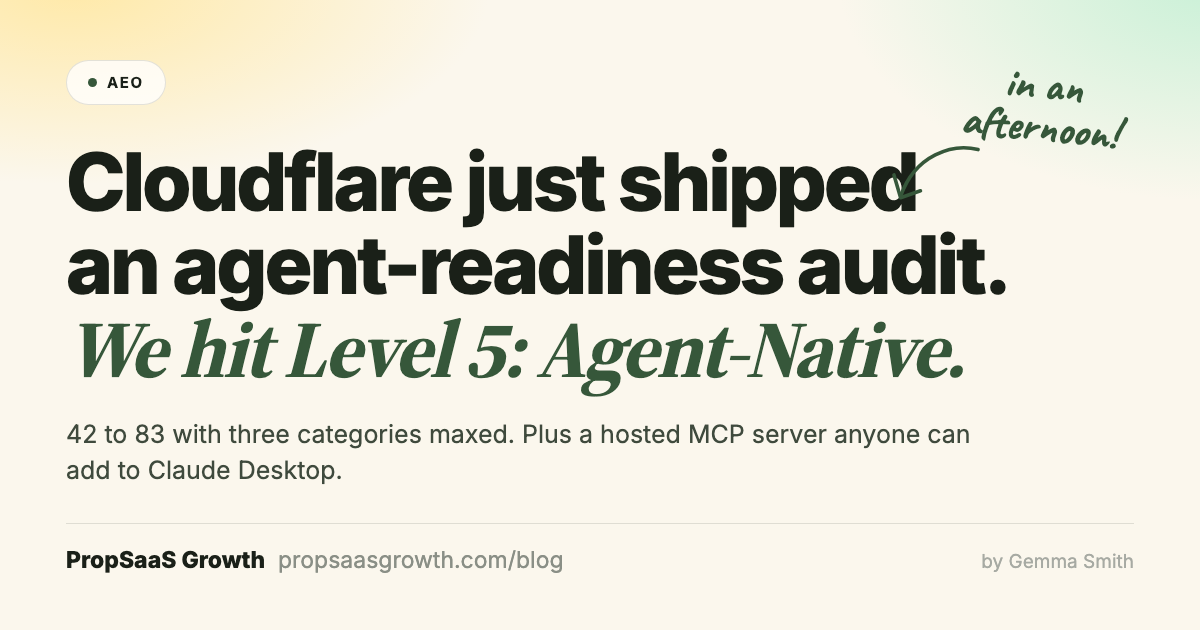
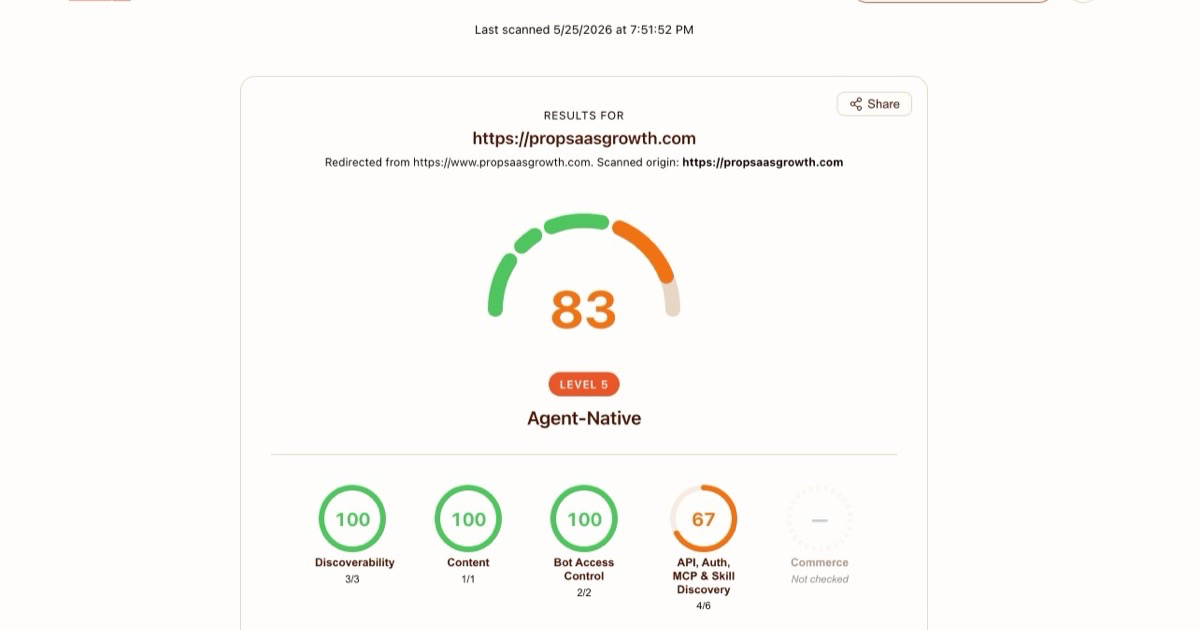
I ran my own marketing site through Cloudflare's free agent-readiness audit on a Sunday afternoon. propsaasgrowth.com started at 42 ("Bot-Aware," Level 2). It finished at 83, the top tier: Level 5, "Agent-Native," with three of the four scored categories maxed at 100. In between, I built and shipped a working hosted MCP server that anyone with Claude Desktop can add to their config, so their Claude can autonomously book a discovery call with me.
The whole thing started on LinkedIn. I saw Mark Williams-Cook post about Cloudflare's isitagentready.com audit, ran propsaasgrowth.com through it out of curiosity, and the 42 sent me down a rabbit hole. A few hours later I had a fix list, the fixes implemented, and a hosted MCP server live.
The score jump is not really the story. The story is how short the gap has gotten between "I want this thing to exist on my site" and "I have shipped it." AI tools have collapsed that loop in ways I am still adjusting to. All of this happened in a single session with Claude Code, with me driving.
If you run a B2B SaaS marketing site and your AEO consultancy is telling you to add an llms.txt and call it a day, this post is the longer answer to what being actually agent-ready looks like in practice.
What "agent-ready" actually means
Cloudflare runs a free audit at isitagentready.com that probes a homepage for a checklist of signals AI agents look for. It is not a single test. It is roughly fifteen separate probes grouped into five categories:
- Discoverability. Response headers and metadata that point agents to the resources on your site (sitemap, service documentation, API catalog, MCP server). Mostly RFC 8288 Link header relations and a Markdown content-negotiation check.
- Content. Whether your site serves a Markdown version of a page when an agent requests one with
Accept: text/markdown. Optional for humans, useful for agents that would rather parse plain text than HTML. - Bot access control. robots.txt, plus the new
Content-Signaldirective that lets you declare AI training, search, and AI-input preferences explicitly. - API, auth, MCP, and skill discovery. The harder set. RFC 9727 API catalog, OAuth/OIDC discovery, OAuth Protected Resource metadata, MCP Server Card (SEP-1649), Agent Skills index, WebMCP tool registration.
- Commerce. Cloudflare's newest category, marked "Not checked" on propsaasgrowth.com because there is no commerce surface to probe. For ecommerce sites this will check structured product data and agent-purchasable signals. Not applicable to a B2B SaaS marketing site, so it does not factor into the score.
The overall score maps to a tier, "Bot-Aware" at Level 2, "Agent-Aware" at Level 3, "Agent-Ready" at Level 4, "Agent-Native" at Level 5. Most marketing sites land at Level 2. To get to Level 5 you need three things at once: clean discoverability, working MCP/WebMCP infrastructure, and explicit content-signal declarations.
The starting score of 42 reflected the work I had already done on propsaasgrowth.com this month: a declarative WebMCP book_consultation tool on the homepage, a clean robots.txt, an llms.txt file. The remaining work was everything else.
From 42 to 83: what I shipped
Each finding from the Cloudflare audit, in the order it was reported. By the end of the session, three of the four scored categories were at 100 (Discoverability, Content, Bot Access Control), and the fourth (API/Auth/MCP/Skill) was at 67, capped by the two OAuth findings I deliberately left alone (more on that below).
1. Link headers with agent-useful relations
The audit wants a Link: response header on the homepage pointing agents to useful resources. My first pass advertised </sitemap.xml>; rel="sitemap" and </llms.txt>; rel="https://llmstxt.org/". The audit accepted the header but flagged the relation types as "not agent-useful": it specifically rewards rel="service-doc", rel="service-desc", rel="api-catalog", rel="mcp". I swapped to those. The current homepage now sends:
Link: </sitemap.xml>; rel="sitemap",
      </llms.txt>; rel="service-doc"; type="text/markdown",
      </.well-known/api-catalog>; rel="api-catalog"; type="application/linkset+json",
      </.well-known/mcp/server-card.json>; rel="mcp"; type="application/json"
2. Markdown content negotiation
When an agent requests the homepage with Accept: text/markdown, the server now returns the llms.txt summary with Content-Type: text/markdown; charset=utf-8. Browsers and Googlebot do not send that Accept header, so they continue to receive the normal HTML. Agents that want plain text get plain text.
3. Content-Signal in robots.txt
Added one line to the wildcard user-agent block: Content-Signal: ai-train=yes, search=yes, ai-input=yes. This is the declarative form of what my robots.txt already implied by allowing GPTBot, ClaudeBot, CCBot, and the rest. It is also a values call. If you do not want AI training on your content, declare it here. Pretending you do not have a position is no longer credible.
4. API catalog (RFC 9727)
Published /.well-known/api-catalog as application/linkset+json. The honest content: one entry pointing to the homepage as service-desc (where the WebMCP tool is registered) and /llms.txt as service-doc. No fake REST endpoints. The audit just checks that the well-known path returns a valid linkset.
5. Agent Skills index with a real SKILL.md
Published /.well-known/agent-skills/index.json per Cloudflare's Agent Skills Discovery RFC v0.2.0, plus one real Skill artifact at /.well-known/agent-skills/engagement-briefing/SKILL.md.
The Skill teaches an AI agent what to gather from a user before invoking the book_consultation tool: the specific problem they want to solve, their current stack and team, vertical and stage. It also tells agents what not to ask for, like budget or headcount, because that would feel like qualifying the user out before a human conversation. Agents that load the Skill will brief Calendly bookings far more competently than ones that do not.
6. WebMCP imperative API
I already had a declarative WebMCP form on the homepage. Cloudflare's audit specifically probes for navigator.modelContext.provideContext(), the JavaScript-API version of the same registration. I added an imperative registration that mirrors the declarative form, feature-gated so non-supporting browsers (Googlebot included) ignore it entirely. Two paths to the same tool now. Three, counting the chat agent that calls the same booking tool for visitors who are reading the page themselves.
7. MCP Server Card
Published /.well-known/mcp/server-card.json with serverInfo, transport, and capabilities. The transport URL points to a real hosted MCP server I built and deployed in the same session, which is the next section.
The real artifact is a hosted MCP server
Everything to this point was metadata: tell agents where things are, declare preferences, advertise tools. The MCP Server Card is the only finding that requires you to actually have the thing you are claiming to have. Publishing an MCP Server Card without a working server would be misleading. Agents that discovered the card would try to connect to the transport URL and get nothing back.
So I built a real MCP server, hosted it on Cloudflare Workers, and deployed it at propsaas-mcp-server.propsaasgrowthdigitalinc.workers.dev.
It exposes one tool, book_consultation, over two transports: SSE for clients like Claude Desktop, and Streamable HTTP for newer MCP clients. The tool mirrors the WebMCP tool on the homepage. An agent calls book_consultation(name, email, topic), the server constructs a pre-filled Calendly URL, returns it. Same logic, different transport.
The infrastructure: Cloudflare Workers, the agents v0.13.2 SDK from Cloudflare, a Durable Object backing per-session MCP state, @modelcontextprotocol/sdk for the actual MCP server. The Worker is roughly a hundred lines of TypeScript and costs effectively nothing to run.
To add it to Claude Desktop, drop this into your MCP servers config:
{
  "mcpServers": {
    "propsaas-growth": {
      "url": "https://propsaas-mcp-server.propsaasgrowthdigitalinc.workers.dev/sse"
    }
  }
}
Your Claude can now autonomously book a discovery call with PropSaaS Growth. That is the part most B2B SaaS marketing sites cannot do.
The score is incidental. The hosted MCP server is the real artifact. Anyone with Claude Desktop can add it in thirty seconds, and their AI can book a call with PropSaaS Growth from a single prompt.
What I deliberately did not do, and why
The audit has two findings I did not address: OAuth/OIDC discovery and OAuth Protected Resource metadata. Both expect you to publish well-known JSON files describing how an agent should authenticate against protected APIs on your site.
I do not have protected APIs. Publishing those files anyway would mean writing fake URLs for authorization_endpoint, token_endpoint, and jwks_uri. Any agent that read the metadata and tried to authenticate would fail at every endpoint. That is worse than the absence of the metadata. The audit penalizes a missing file. Agents penalize a broken system.
So 83 is the honest ceiling for propsaasgrowth.com. Getting to 100 would mean standing up a real OAuth provider, building protected APIs, and gating something behind authentication. That is a business decision, not a checkbox fix, and it does not fit a marketing site whose job is to convert anonymous visitors into discovery calls.
If your AEO consultancy is selling you on "we will get you to 100 on Cloudflare's audit," ask them how. If the answer involves publishing OAuth metadata without real auth infrastructure behind it, that is the answer. It is bad advice.
How Claude Code actually drove the work
The loop, in plain English:
- I pasted each Cloudflare audit finding into Claude Code, one at a time.
- Claude read the existing code: my Express
server.js,public/index.html, robots.txt, the existing Cloudflare Worker for the chat agent. - Claude wrote the changes directly, ran
git commitandgit push, and polled the live site to confirm each deploy had landed before moving to the next finding. - For most changes (Express middleware, the .well-known JSON endpoints, the imperative WebMCP registration), that was the entire flow. I watched it work, made a few content judgment calls (Content-Signal values, the voice of the SKILL.md), and the rest happened in the background.
The piece where I had to step in was the MCP server deploy. Claude wrote the entire Cloudflare Worker, typechecked it, and committed it. But Cloudflare deploys need my Wrangler authentication, which only exists on my laptop. So I ran npx wrangler deploy myself.
The first deploy used an older version of the agents SDK and threw a 500 on the SSE endpoint. Claude read the SDK source directly out of node_modules, noticed the API surface had changed in newer versions, bumped the dependency, rewrote the worker against the new API, and we redeployed. The whole back-and-forth took under twenty minutes.
For an AEO consultancy specifically, this workflow matters because the work is not theoretical. I am advising clients on agent-readiness while running my own site through the same audits. The pattern of "I shipped it on my own site first" is not a marketing claim, it is the actual artifact. And the tool I shipped with, an AI agent that lives in a terminal and operates a codebase, happens to be exactly the kind of agent the readiness audit is measuring readiness for.
The takeaway
If you run a B2B SaaS marketing site and you are wondering whether you should be doing anything about AI agents, the honest answer for most sites in 2026 is "a little, and now." Add a sensible Content-Signal directive to your robots.txt. Set a Link header on your homepage with agent-useful relations. Decide whether to support Markdown content negotiation, depending on how much of your inbound traffic is becoming agentic. These are afternoon-sized moves that quietly compound.
If you actually want agents to be able to do something on your behalf, you need a tool they can call. The cheapest version is a declarative WebMCP form on a page that already has the action behind it. The more demoable version is a hosted MCP server that an agent can connect to from anywhere, the same way Claude Desktop adds the propsaas-growth server in thirty seconds today. That is the difference between "we talk about AEO" and "our site is actually agent-discoverable in the field." It is a wider gap than most marketing teams realize, and right now it is uncrowded.
For the broader technical foundation, see our Technical SEO service: CWV, schema, internal linking and AI crawler access.
Frequently asked questions
What does it actually mean for a website to be agent-ready?
Agent-ready means an AI agent landing on your site can find the resources it needs (sitemap, service docs, MCP server, declared content preferences) and, where useful, actually do something on your behalf rather than just read your HTML. Cloudflare's free audit at isitagentready.com probes about fifteen separate signals across five categories: discoverability, content negotiation, bot access control, API/auth/MCP/skill discovery, and commerce. The overall score maps to a tier ladder from "Bot-Aware" at Level 2 up to "Agent-Native" at Level 5. Most marketing sites land at Level 2.
Do I need a hosted MCP server, or is WebMCP enough?
It depends on where your buyers are. WebMCP works in the browser only, so it only helps if your buyer is using an agent inside a Chromium-based browser. A hosted MCP server works for any MCP client, including Claude Desktop, custom agents, and AI coding tools. If you want a real, demoable artifact a buyer can add to their MCP config in 30 seconds, you want a hosted MCP server. If you just want a tool that page visitors with agentic browsers can use, WebMCP is enough.
Why did you stop at 83 instead of going to 100?
83 is already the top tier on the audit, Level 5, "Agent-Native." The remaining 17 points come from OAuth/OIDC discovery and OAuth Protected Resource metadata, two findings inside the API/Auth/MCP/Skill category. Both expect you to publish well-known JSON files declaring how an agent should authenticate against protected APIs on your site. I do not have protected APIs. Publishing those files anyway means writing fake URLs for authorization, token, and JWKS endpoints, which causes agents that try to authenticate to fail at every step. That is worse for agent UX than the absence of the metadata. 83 is the honest ceiling for a marketing site without real auth infrastructure.
How much did the hosted MCP server cost to build and run?
The MCP server runs on Cloudflare Workers within the existing Workers Paid plan (about $5 a month) that already hosts the visitor chat agent. The new MCP server gets effectively no incremental traffic for a marketing site, so it fits inside that plan with no additional cost. There are no LLM API calls in the loop, the server just receives tool calls and constructs Calendly URLs, so there are zero recurring per-call costs. The build itself was a single Claude Code session, finished the same afternoon.
What is Claude Code's role here, and what couldn't it do alone?
Claude Code drove the entire codebase side: reading existing files, writing changes to server.js, robots.txt, index.html, and the new mcp-server worker directory, running git commit and git push, and polling the live site to confirm each deploy. The piece it could not do alone was the Cloudflare deploy itself, which needs my Wrangler authentication credentials. I ran the npx wrangler deploy commands manually from my terminal, and Claude Code handled everything before and after.
Should I do this for my own B2B SaaS marketing site?
Most of it, yes. Setting Link headers with agent-useful relations, adding a Content-Signal directive to robots.txt, publishing an API catalog and Agent Skills index, and exposing a WebMCP tool on whichever page already has the action behind it (booking, demo request, quote) is all low cost and meaningful. The hosted MCP server is the bigger decision: build it if you have a specific buyer action worth automating and you want a demoable agent-discoverable surface. Skip the OAuth findings unless you actually have protected APIs.

Gemma Smith, Founder, PropSaaS Growth
SEO, AEO, and content strategy for PropTech, FinTech, and B2B SaaS companies. 10+ years in PropTech. Active engagements with vertical SaaS platforms.